Showing posts with label Google. Show all posts

Thursday, January 18, 2024

Download size only 0.11 MB --- a PURE app for Android on Google Play Store

Download size is only 0.11 MB --- a minimalist app for Android which is available on Google Play Store


1. Lightweight enough( download size < 0.12 MB ),

2. Pure enough( not only Ad-Free, but almost NO 'Application Permissions' required at all ),

3. High Precision ( Every conversion result is accurate enough. Check the app screenshots on Google Play, please. )


Links to Google Play web: 

https://play.google.com/store/apps/details?id=xadave.SmartUnitConverterFree_Google

https://play.google.com/store/apps/details?id=xadave.SmartUnitConverterPro_Google


Links into Play Store app: 

market://details?id=xadave.SmartUnitConverterFree_Google

market://details?id=xadave.SmartUnitConverterPro_Google


On Google Play web or Play Store app, search for the keyword 'SmartUnitConverterPro_Google' , 'SmartUnitConverterFree_Google', or 'SmartUnitConverterPure' , you can quickly find these pure apps, Smart Unit Converter Pro or Smart Unit Converter Pure/Free. 😀


Short URLs for these pure apps on Google Play -

https://goo.gl/ws42fN

https://goo.gl/vf1rxW


Thursday, February 9, 2023

10 Redeem Codes for Play Store: Full-free Downloading a paid & minimal app for Android. Get it ASAP. :-) :-) :-)

10 Redeem Codes for Google Play Store:  full-free downloading a paid utility app for Android. 


Get it as soon as possible if you need. 😀😀😀

https://www.reddit.com/r/androidapps/comments/10vrf7h/dev_hey_i_made_several_promo_codes_for_an_utility/


Please remember to upvote this Reddit post. 😃😃😃

* * The redeem codes are valid untill 02/21 11:00pm GMT.


The minimal utility app on Google Play -

https://play.google.com/store/apps/details?id=xadave.SmartUnitConverterPro_Google


6SYTAAGTJ0LYH9HMRDDD63U

YCQGLLFL6T4WV1BND8VCQ7C


L4N7686XTQJYZRYEMCVYRDC

XYCKCQUJXNLD3H2KEC0ANSG


G8NFE0U85S3ZJA9EV5M98YC

ECZWKBL20105MA2U1SYDWU4


HGJS8X0JW99J3VGLTB7CU26

KGLNC2W6JLRAQMH72Y0NPSZ


RWXKHGWNB00XYCF86HU9VMP

5GMLV6WH8HNMZ1UEUSBCAXC

Saturday, January 14, 2023

[Solved] The stock Camera app in Android Emulator could not take any photo - error msg: Insert an SD card before using the camera. What's wrong with the AVD?

I created an AVD (Android Virtual Device) based on API Level 28 (Android 9.0). But when I tried to take a photo, the stock Camera app said "Insert an SD card before using the camera". Check the screentshot as below. So, I failed to take any photo at all.


But in fact, in the AVD Advanced Settings, already there is a 'Studio-managed SD card' set up for this AVD.


The Android Emulator I used -


The System Image I used for this AVD -


Now I wonder,

Q1: Why couldn't the built-in camera app of this AVD take any picture? Why is an SD card necessary for taking a photo? Why couldn't the Studio-managed SD card be recognized?

Q2: Do you all also have this issue in the AVD created on your PC?

Q3: Should this be because there is a bug in this API Level 28 System Image, or is the version of Android Emulator defective?


Any ideas? Thank you all for your attention. Have a good weekend.


Updated on Jan 16, 2023. -----------------------------------------------------------------

After Google search, research, and several comparison experiments, I found out that this problem is because this 64-bit System Image is likely to have a bug about camera feature. Use the x86 System Image for your Android 9.0 AVD instead even if your Windows host is 64-bit.

Share it for your reference.


Saturday, November 27, 2021

A lightweight & pure enough app for Android on Google Play

A minimalist utility app for Android which is available on Google Play ---


1. Lightweight enough( download size < 0.12 MB ),
2. Pure enough( not only Ad-Free, but almost NO 'Permissions' required ),
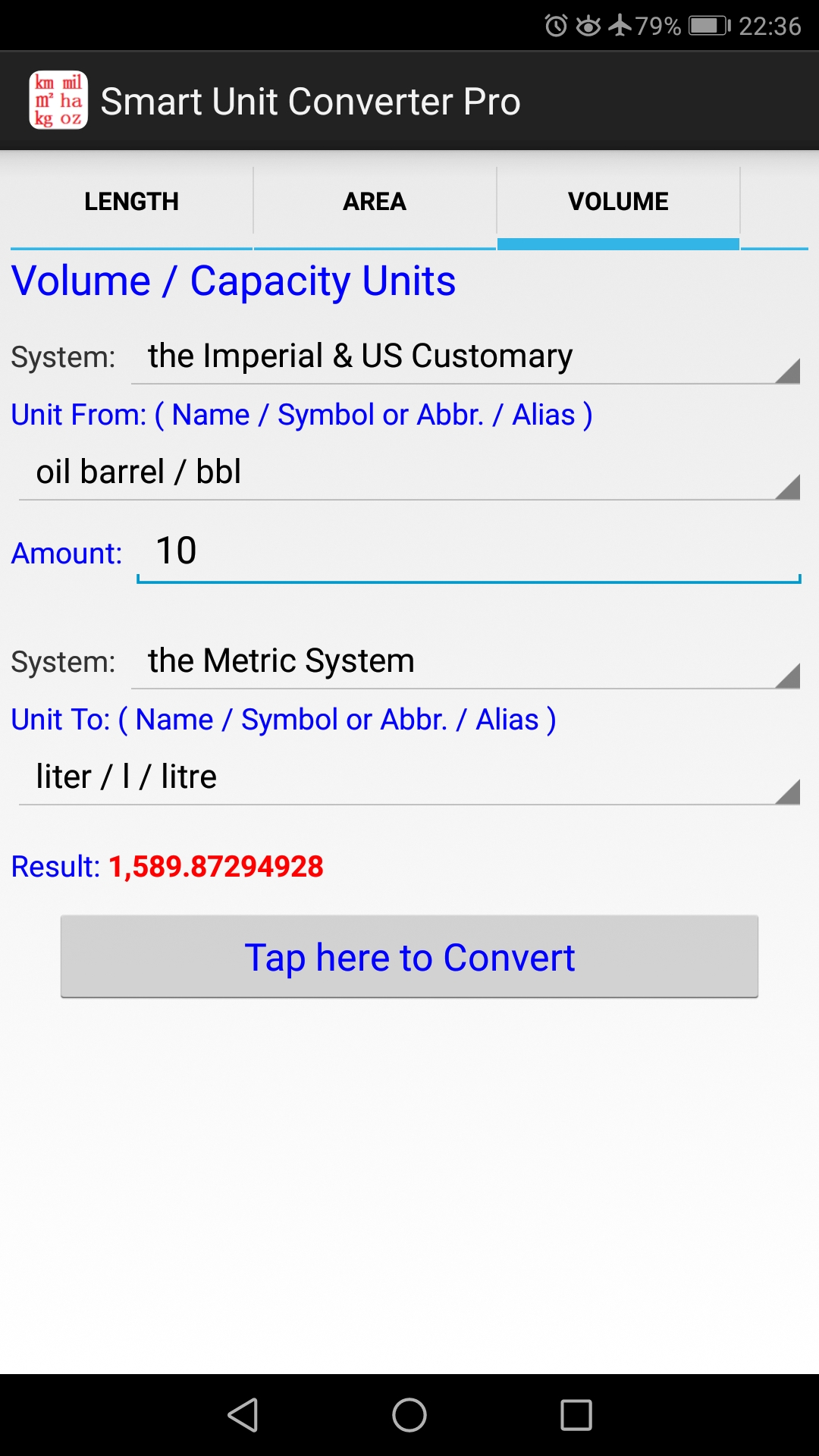
3. High Precision( check the app screenshots as below ).

----------------------------------------------------------------------------------------------

This minimalist APP respects your privacy, devices, and your time.


Full-free edition:         Smart Unit Converter Free
Full-featured edition:  Smart Unit Converter Pro

----------------------------------------------------------------------------------------------

Key Features - 

1. Accurate & High Precision in any unit conversion results.

   This is a distinguished feature of the utility apps. Check the app screenshots as below.

   It is just for those who need Maximum Precision in basic unit conversions.


2. Pure and Ad-free.

   Not only is the utility app Ad-free, but even almost NOT any "Application Permissions" is required at all. As a result, the app is safe and reliable enough for end users.

   This pure app implements any unit conversions completely in Android devices offline, without network access. That means you can perform unit conversions with the utility app anywhere even if your device has no internet connection.

   Enjoy a faster, cleaner experience with this Android app. :-)


3. Lightweight enough.

   The utility app is so lightweight that the download size is less than 0.12 MB ! 

   Very few unit converter apps are more lightweight than this one.


----------------------------------------------------------------------------------------------

The links to Google Play Store
---------------------------------------------------------------------------------------------

Full-free edition -  

Link to Play Store web: https://play.google.com/store/apps/details?id=xadave.SmartUnitConverterFree_Google

Link into Play Store app: market://details?id=xadave.SmartUnitConverterFree_Google


Full-featured edition - 

Link to Play Store web: https://play.google.com/store/apps/details?id=xadave.SmartUnitConverterPro_Google

Link into Play Store app: market://details?id=xadave.SmartUnitConverterPro_Google


On Google Play web or Play Store app, search for the keywords 'SmartUnitConverterPro_Google' , or 'SmartUnitConverterFree_Google', you can quickly find these pure apps, Smart Unit Converter Pro or Smart Unit Converter Pure/Free. 😀

It will be appreciated if you would like to leave a 5-star rating for these 2 minimalist apps for Android. Thank you very much in advance. ðŸ˜€


* The utility app just focuses on the basic unit categories. It is expected to help those who need exact conversions between the Imperial or US customary system and the Metric system for those basic units of measurement.


----------------------------------------------------------------------------------------------

More App Screenshots - 


----------------------------------------------------------------------------------------------

On Google Play web or Play Store app, search for the keyword of 'SmartUnitConverterFree' , or 'smart unit converter pure' ,  you can quickly find these pure apps, Smart Unit Converter Pro or Smart Unit Converter Pure/Free. 😀

======================================================

Monday, September 19, 2016

What is 'Permission' of Apps? And What's a Good Guy App?

Most Google Play users don't consider 'Permissions' when they select and install an app, or when they rate it.


What is 'Permission' of Android Apps?


It's simple: Permissions are special privileges that apps must ask for if they want to access sensitive media on your phone.

Because our phones contain so much personal information --- like our exact location, contact data, and cameras that can record us --- apps can't just use these unless we tell them it's okay.


But in fact, there are too many apps in the Play Store that are rated highly, but still copy your address book back to the mother ship.


Good Guy Apps serves to speak to this Play Store shortsightedness.


So, what's a Good Guy App?


  • It doesn't require Permissions for phone/device resources that are not required for its function.
  • It respects your other resources such as RAM, storage, and battery.
  • It's housebroken. It doesn't leave crap everywhere and it cleans up after itself when uninstalled.


In one word, a Good Guy App respects our privacy, device, and our time.

reddit: https://www.reddit.com/r/goodguyapps


Then, how to recognize a Good Guy App on Google Play?


In details page of some app on Play Store ,

1. First of all, we should click Permissions field to view the required Permissions detail.

2. It's better if the app has a declared Privacy Policy.

3. We can also view its Size to check if it's lightweight enough.

4. Read its Features list and Reviews fully, please.


Smart Unit Converter Pro is a classic sample of good guy app, which is available on Google Play Store.